As single-cell data complexity grows, integrating multiple datasets has become standard. However, batch effects—arising from technical and biological variations—must be corrected for accurate analysis. These effects stem from differences in sample handling, protocols, sequencing platforms, and biological factors like donor background or tissue origin. Computational methods help eliminate unwanted variation, ensuring biologically meaningful signals. Batch correction requires two key decisions: selecting the appropriate method and its parameters, and defining the batch covariate based on the integration objective. In this notebook, we explore core concepts and methods for data integration and batch correction, with hands-on activities using Seurat and Harmony. Additionally, we perform benchmarking to compare integration strategies, helping select the most effective method while preserving biological relevance.
download.file("https://github.com/eddelbuettel/r2u/raw/master/inst/scripts/add_cranapt_jammy.sh",
"add_cranapt_jammy.sh")
Sys.chmod("add_cranapt_jammy.sh", "0755")
system("./add_cranapt_jammy.sh")
bspm::enable()
options(bspm.version.check=FALSE)
We will create an R function to performs system calls
shell_call <- function(command, ...) {
result <- system(command, intern = TRUE, ...)
cat(paste0(result, collapse = "\n"))
}
Install required libraries
# Install the R.utils package
install.packages("R.utils")
# Install a specific commit/version of the Seurat Wrappers package from GitHub
remotes::install_github('satijalab/seurat-wrappers@d28512f804d5fe05e6d68900ca9221020d52cf1d', upgrade = FALSE)
# Install the Seurat Data package from GitHub
remotes::install_github('satijalab/seurat-data')
# Check if the BiocManager package is installed; if not, install it quietly
if (!require("BiocManager", quietly = TRUE))
install.packages("BiocManager", quiet = TRUE)
# Install the Harmony package for integrating single-cell datasets
install.packages("harmony")
Integration is a technique used to combine single cell data from different experiments or conditions into a single analysis space. This is especially useful where data from different batches or conditions can be integrated to identify common biological patterns. In this example of integrating multiple datasets representing, for example, different biological conditions, sample handling, or experimental protocols, we will explore the integration performed by Seurat and Harmony separately.
# Load libraries
library(Seurat)
library(SeuratData)
library(SeuratWrappers)
library(cowplot)
library(harmony)
# If the time is over than 2000 seconds, the work will break
options(timeout=2000)
Here, we load the datasets necessary to perform an integration analysis.
This tutorial demonstrates the integration process using peripheral blood mononuclear cells (PBMCs) data from the study by Kang et al, 2017. The experiment involved splitting PBMCs into two groups: one control group and one stimulated group treated with interferon beta. The treatment induced cell type-specific gene expression changes, creating a challenge for joint analysis. Without integration, cells may cluster based on their stimulation condition rather than their intrinsic cell type identity, complicating the interpretation of results.
To clarify, the integration aims to align data from both groups into a common space where cells cluster by type rather than treatment condition. This process is essential for accurately identifying shared and unique features across the datasets while minimizing the influence of batch effects introduced by the experimental design.
Steps to follow:
# install dataset
InstallData("ifnb")
# load dataset
LoadData("ifnb")
# Transfer ifnb data to sc_dataset
sc_datasets <- ifnb)
# %>%: This is the operator from the dplyr package. It allows you to chain operations in a readable way, passing the result of one operation as input to the next.
# glimpse is a function of the dplyr package that provides a quick and concise view of the dataset, showing the first values of each column and the respective classes.
sc_datasets %>% dplyr::glimpse()
We preprocess the data to a point that is in common for both Seurat and Harmony data integration.
# Update the Seurat object to the latest format, fixing compatibility issues with older Seurat objects
sc_datasets <- UpdateSeuratObject(object = sc_datasets)
# If this step is skipped, an error occurs: 'no slot of name "images" for this object of class "Seurat"'
# Normalize the gene expression data in the Seurat object
sc_datasets <- Seurat::NormalizeData(sc_datasets, verbose = FALSE)
The NormalizeData function in Seurat simplifies raw single-cell RNA sequencing (scRNA-seq) data into a standardized form, making it easier to compare cells and detect meaningful biological patterns. This process involves three main steps:
This method is essential because it ensures that any differences observed between cells reflect true biological variations, not technical differences from the sequencing process
# View the structure of the Seurat object, including metadata and feature data
dplyr::glimpse(sc_datasets)
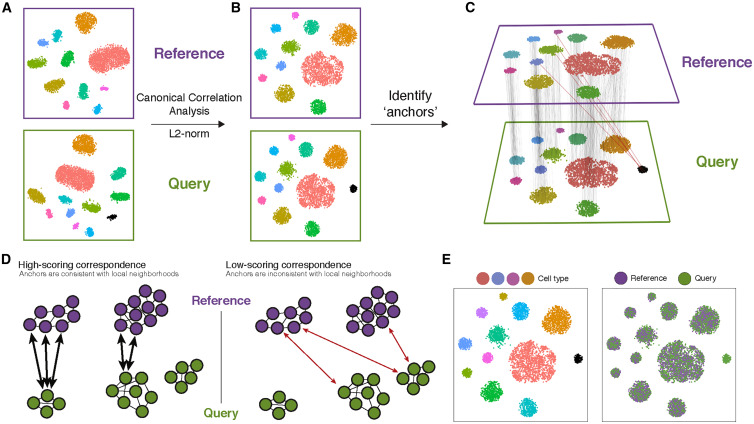
The integration performed here with Seurat consists of using a Canonical Correlation Analysis to identify anchors between datasets, as indicated in the original paper:
Split dataset into a list of datasets
# Identify the top 2000 variable features for each dataset in the list
sc_datasets.list <- lapply(X = sc_datasets.list, FUN = function(x) {
x <- FindVariableFeatures(x, selection.method = "vst", nfeatures = 2000)
})
Find highly variable features for each condition separately
# Identify integration features to be used for aligning datasets
features <- SelectIntegrationFeatures(object.list = sc_datasets.list)
Find the features that are repeatedly variable across datasets for integration (anchor features).
# Find integration anchors between the datasets using the selected features
sc_datasets.anchors <- FindIntegrationAnchors(object.list = sc_datasets.list, anchor.features = features)
# Below is the resume of the running process that will appear in your screen
Integrate datasets - Creates an integrated data assay
# Integrate the datasets into a single Seurat object using the integration anchors
sc_datasets.combined <- IntegrateData(anchorset = sc_datasets.anchors)
# Below is the resume of the running process that will appear in your screen
# View the structure of the integrated Seurat object
dplyr::glimpse(sc_datasets.combined)
Run the standard workflow for visualization and clustering.
# Scale the integrated data, run PCA, perform UMAP for dimensionality reduction, find neighbors, and cluster cells
sc_datasets.combined <- ScaleData(sc_datasets.combined, verbose = FALSE) %>%
RunPCA(npcs = 30, verbose = FALSE) %>%
RunUMAP(reduction = "pca", dims = 1:30) %>%
FindNeighbors(reduction = "pca", dims = 1:30) %>%
FindClusters(resolution = 0.5)
# Set the size of the plots for visualization
options(repr.plot.height = 5, repr.plot.width = 16)
# Visualization: Create UMAP plots with different grouping or labeling options
p1 <- DimPlot(sc_datasets.combined, reduction = "umap", group.by = "stim") # Group cells by "stim" metadata
p2 <- DimPlot(sc_datasets.combined, reduction = "umap", label = TRUE, repel = TRUE) # Label clusters on the UMAP
p3 <- DimPlot(sc_datasets.combined, reduction = "umap", group.by = "seurat_annotations") # Group by annotations
p1 + p2 + p3 # Combine the plots
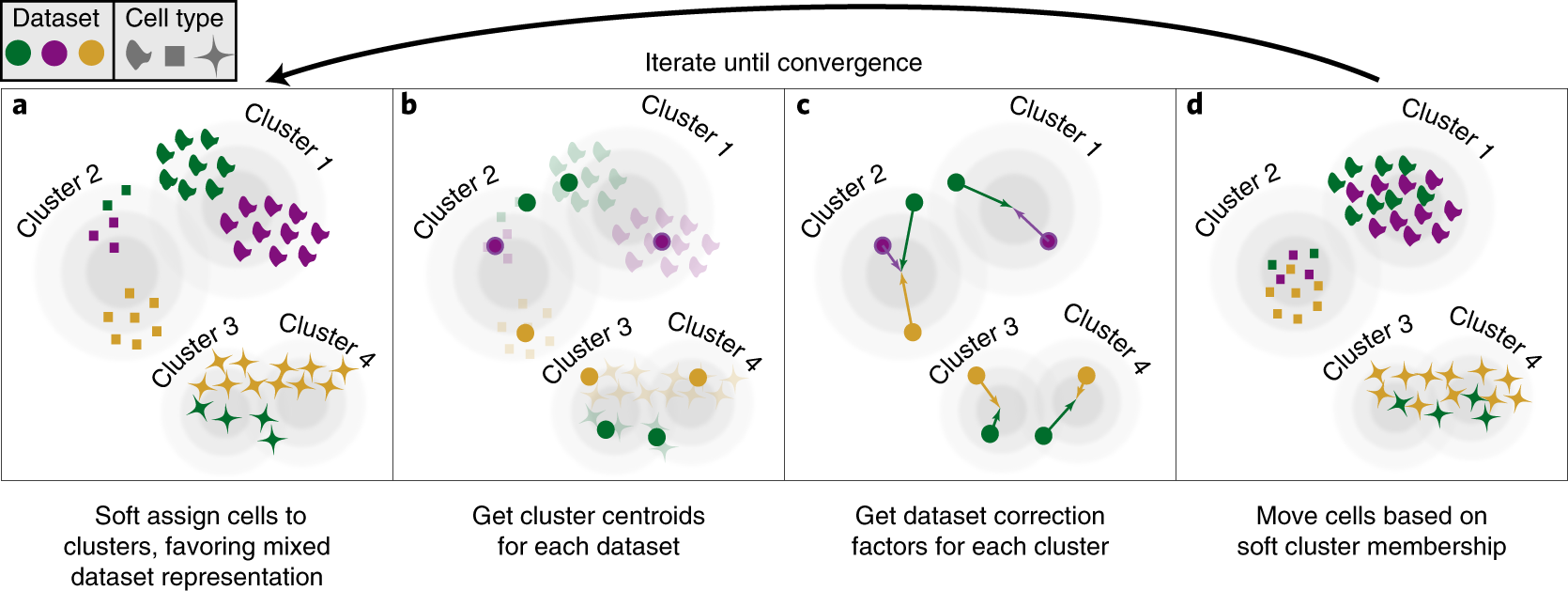
From the original paper of harmony: PCA embeds cells into a space with reduced dimensionality. Harmony accepts the cell coordinates in this reduced space and runs an iterative algorithm to adjust for dataset specific effects:
# Set the plot dimensions for visualization
options(repr.plot.height = 4, repr.plot.width = 6)
# Find variable features, scale data, run PCA, and integrate using Harmony
sc_datasets.harmony <- FindVariableFeatures(sc_datasets, selection.method = "vst", nfeatures = 2000) %>%
ScaleData(verbose = FALSE) %>%
RunPCA(npcs = 30, verbose = FALSE) %>%
RunHarmony("stim", plot_convergence = TRUE) # Integrate using "stim" as a batch variable
To directly access the harmonized embeddings:
# Extract Harmony embeddings (low-dimensional representations) and display the first 5 rows and columns
harmony_embeddings <- Embeddings(sc_datasets.harmony, 'harmony')
harmony_embeddings[1:5, 1:5]
# Run UMAP using Harmony embeddings, find neighbors, and cluster cells
sc_datasets.harmony <- RunUMAP(sc_datasets.harmony, reduction = "harmony", dims = 1:30) %>%
FindNeighbors(reduction = "harmony", dims = 1:30) %>%
FindClusters(resolution = 0.5)
# Set plot dimensions for visualization
options(repr.plot.height = 5, repr.plot.width = 16)
# Visualization: Create UMAP plots with different grouping or labeling options
p1 <- DimPlot(sc_datasets.harmony, reduction = "umap", group.by = "stim") # Group by "stim"
p2 <- DimPlot(sc_datasets.harmony, reduction = "umap", label = TRUE, repel = TRUE) # Label clusters
p3 <- DimPlot(sc_datasets.harmony, reduction = "umap", group.by = "seurat_annotations") # Group by annotations
p1 + p2 + p3 # Combine the plots
Inspect mixing within cluster
We will use a function to plot the batch composition of each cluster.
This function was borrowed from: https://github.com/cellgeni/scRNA.seq.course/blob/master/course_files/utils/custom_seurat_functions.R
# Define a custom function to visualize the distribution of clusters across datasets
plot_integrated_clusters = function(srat, batchcolumn) {
## Take an integrated Seurat object and plot distributions across the "batchcolumn"
library(Seurat)
library(patchwork)
library(ggplot2)
library(reshape2)
library(RColorBrewer)
# Create a table of cell counts by cluster and dataset
count_table <- table(srat@meta.data$seurat_clusters, srat@meta.data[[batchcolumn]])
count_mtx <- as.data.frame.matrix(count_table) # Convert table to a data frame
count_mtx$cluster <- rownames(count_mtx) # Add cluster identifiers as a column
melt_mtx <- melt(count_mtx) # Reshape data for ggplot
melt_mtx$cluster <- as.factor(melt_mtx$cluster) # Convert cluster column to a factor
# Calculate cluster sizes
cluster_size <- aggregate(value ~ cluster, data = melt_mtx, FUN = sum)
# Sort clusters by size
sorted_labels <- paste(sort(as.integer(levels(cluster_size$cluster)), decreasing = TRUE))
cluster_size$cluster <- factor(cluster_size$cluster, levels = sorted_labels)
melt_mtx$cluster <- factor(melt_mtx$cluster, levels = sorted_labels)
colnames(melt_mtx)[2] <- "dataset" # Rename column for clarity
# Plot the distribution of cells per cluster (log scale)
p1 <- ggplot(cluster_size, aes(y = cluster, x = value)) +
geom_bar(position = "dodge", stat = "identity", fill = "grey60") +
theme_bw() + scale_x_log10() + xlab("Cells per cluster, log10 scale") + ylab("")
# Plot the fraction of cells in each dataset for each cluster
p2 <- ggplot(melt_mtx, aes(x = cluster, y = value, fill = dataset)) +
geom_bar(position = "fill", stat = "identity") +
theme_bw() + coord_flip() +
scale_fill_brewer(palette = "Set2") +
ylab("Fraction of cells in each dataset") + xlab("Cluster number") + theme(legend.position = "top")
p2 + p1 + plot_layout(widths = c(3, 1)) # Combine plots
}
# Visualize clusters for integrated datasets
plot_integrated_clusters(sc_datasets.combined, 'stim')
# Visualize clusters for harmony
plot_integrated_clusters(sc_datasets.harmony, 'stim')
This measures how well mixed a composite dataset is. According to this link, lower scores represent better mixing. See also this code
This metric evaluates whether the neighborhood of a cell is well mixed. In other words, whether it contains a small number of cells from each dataset (e.g., k=5).
# Calculate the mixing metric for Seurat integrated data
seurat_mixing <- MixingMetric(sc_datasets.combined,
'seurat_clusters', # Column to evaluate mixing
reduction = "pca", # Use PCA embeddings
dims = 1:2, # Evaluate the first two dimensions
k = 5, # Number of nearest neighbors
max.k = 300, # Maximum number of neighbors
eps = 0, # Tolerance for neighbor search
verbose = TRUE # Print progress
)
# Calculate the mean of the Seurat mixing metric
mean(seurat_mixing)
# Calculate the mean of the Seurat mixing metric
mean(seurat_mixing)
# Calculate the mixing metric for Harmony integrated data
harmony_mixing <- MixingMetric(sc_datasets.harmony,
'seurat_clusters',
reduction = "harmony",
dims = 1:2,
k = 5,
max.k = 300,
eps = 0,
verbose = TRUE
)
# Calculate the mean of the Harmony mixing metric
mean(harmony_mixing)
# Calculate the mean of the Harmony mixing metric
mean(harmony_mixing)
# Identify the top 2000 most variable features (genes) using the "vst" method.
# These features are used for downstream analysis.
sc_datasets <- FindVariableFeatures(sc_datasets, selection.method = "vst", nfeatures = 2000) %>%
# Scale and center the data for the identified variable features.
# This standardizes the expression values across cells.
ScaleData(verbose = FALSE) %>%
# Perform Principal Component Analysis (PCA) to reduce dimensionality.
# Retain the first 30 principal components for downstream analysis.
RunPCA(npcs = 30, verbose = FALSE) %>%
# Apply Uniform Manifold Approximation and Projection (UMAP) for non-linear dimensionality reduction.
# Use the PCA results as input and the first 30 principal components.
RunUMAP(reduction = "pca", dims = 1:30) %>%
# Compute a shared nearest neighbor (SNN) graph for clustering.
# This step identifies relationships between cells based on their UMAP embeddings.
FindNeighbors(reduction = "pca", dims = 1:30) %>%
# Perform clustering of cells using the SNN graph.
# Resolution controls the granularity of the clusters (higher resolution = more clusters).
FindClusters(resolution = 0.5)
# Set the size of the output visualization.
options(repr.plot.height = 5, repr.plot.width = 16)
# Create a UMAP plot grouping cells by the "stim" metadata column.
p1 <- DimPlot(sc_datasets, reduction = "umap", group.by = "stim")
# Create a UMAP plot for the integrated dataset, grouping cells by the "stim" metadata column.
p2 <- DimPlot(sc_datasets.combined, reduction = "umap", group.by = "stim")
# Create a UMAP plot for the Harmony-corrected dataset, grouping cells by the "stim" metadata column.
p3 <- DimPlot(sc_datasets.harmony, reduction = "umap", group.by = "stim")
# Combine the three UMAP plots (p1, p2, and p3) into a single visualization.
p1 + p2 + p3
# Set the height and width of the output visualization.
options(repr.plot.height = 5, repr.plot.width = 16)
# Create a UMAP plot for the original sc_datasets object.
# The 'label' parameter adds labels to the clusters in the plot.
# The 'repel' parameter prevents text labels from overlapping.
p1 <- DimPlot(sc_datasets, reduction = "umap", label = TRUE, repel = TRUE)
# Create a UMAP plot for the combined sc_datasets object.
p2 <- DimPlot(sc_datasets.combined, reduction = "umap", label = TRUE, repel = TRUE)
# Create a UMAP plot for the harmony-corrected sc_datasets object.
# This plot also uses UMAP, with labels and repelling to avoid overlaps.
p3 <- DimPlot(sc_datasets.harmony, reduction = "umap", label = TRUE, repel = TRUE)
p1 + p2 + p3 #Combine plots